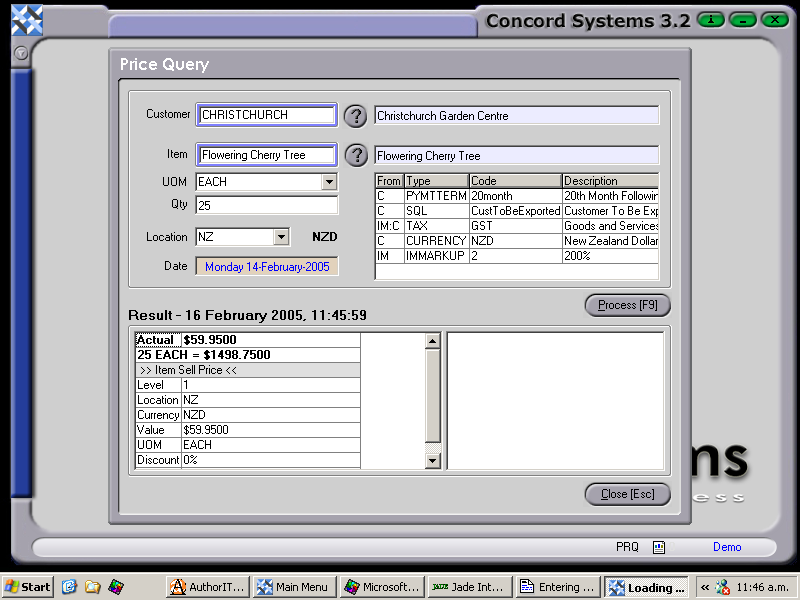
To enter a price query, the procedure is as follows:
Customer. Enter the customer code, or use the [up/down arrow keys] on the keyboard. Alternatively, click on the ? button for the Customer List, click to highlight and Select [F3]. The View [F4] option will go directly to the Customer Maintenance <CM> function.
Item. Enter the Item code, or use the [up/down arrow keys] on the keyboard. Alternatively,click on the ? button for the Item List, click to highlight and Select [F3]. The View [F4] option will go directly to the Item Maintenance <IM> function.
UOM. The Unit of Measure will automatically default to the standard UOM for the Item, but if more than one exist, click on the down arrow and click to highlight.
Quantity. Enter the quantity that the Customer has requested.
Location. Use the down arrow key to select the branch location.
Date. Will default to the current date. To change the day use the [up/down arrow keys], to change the month use the [up/down arrow keys + shift key].
Process [F9]. This will bring up the sell price for the item, within the parameters already selected above.