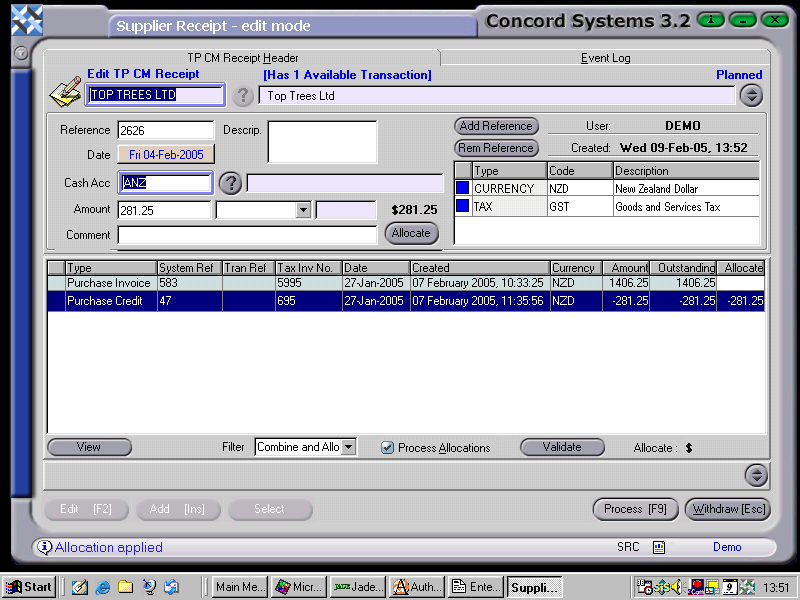
The procedure for entering a Supplier Receipt transaction is as follows:
Select Supplier. Enter in the Supplier name, or use the [up/down arrow keys], or click on the ? button for the Supplier List and click to highlight and select [F3].
Add [INS].
Supplier Reference. Enter if required.
Ensure the Reference Table indicates the Currency and whether GST is applicable.
Date. This will default to the current date. To change the day, use the [up/down arrow keys]. To change the month use the [up/down arrow keys + shift key].
Cash Acc. Enter the bank account the receipt from the supplier is being deposited in. Click on the ? button for the Cash Account List <CAL>. Click to highlight and Select [F3]
Amount. Enter the amount of the receipt.
Is the receipt to be allocated against an outstanding payment? If Yes,
Double click on the appropriate line of the transaction table. This will allocate the full amount. If allocating against several payments, enter the amounts to be allocated in the "Allocate" column. Ensure the "Process Allocations" option is turned on.
8. Process [F9], selecting from the following options:
Process and Complete Immediately. The transaction will be processed as confirmed and completed and will be unable to be edited. The automatic journal entry will also be processed.
Process, but do not Complete Immediately. The transaction will be processed as confirmed, and will be unable to be edited unless a version of the transaction is used. The automatic journal entry will not be processed.
Hold. The transaction will remain in a 'Planned' state and will be able to be edited.
Delete.
Auto Allocate. This must be selected before an allocation can be processed.