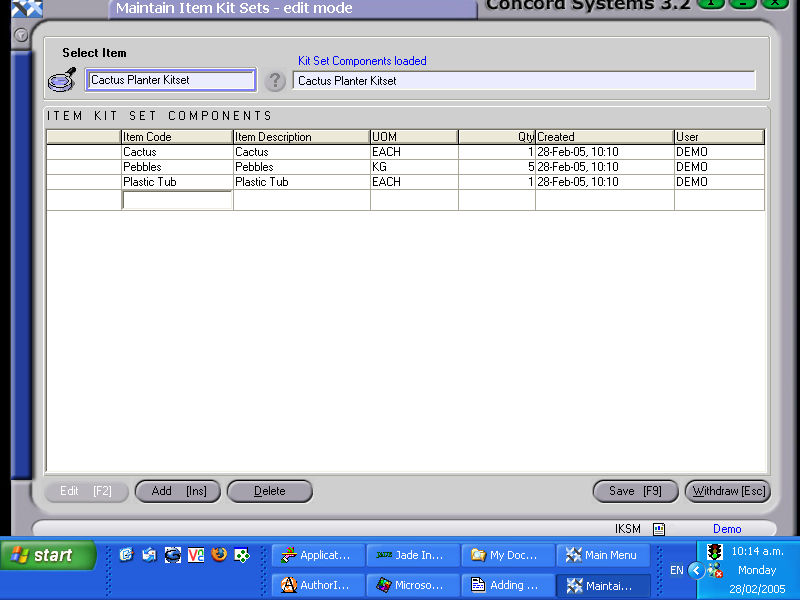
The procedure for adding to or editing a Kitset component is as follows:
Select the Kitset Item, by either
Typing in the name
Using the [up/down arrows] on the keyboard.
Clicking on the ? button and Select [F3] the appropriate item.
The Kitset item should previously have been indicated as being a Consumable Non-Stocked item in the Item Maintenance <IM> screen. Concord will not permit an Addition or Edit to the KitSet component list unless this has been completed. If not completed, an error message that will appear “Not available for Kitsets”.
To edit an existing component, click on the appropriate line to highlight and Edit [F2]
Click on Add [INS] to create a new component.
Click on the following boxes to Edit or Add
Item Code. Select by using the [up/down arrow keys + shift key] on the keyboard.
Item Description. This will automatically appear once the Item Code is entered.
Unit of Measure. This defaults to the Unit of Measure for the component as set up under Item Maintenance <IM>. It can be changed using the down arrow key, but only if the Unit of Measure options are available as set up under Item Maintenance.
Quantity. Change or add as applicable.
Save [F9].
Existing components may also be deleted if required, by clicking on Delete.