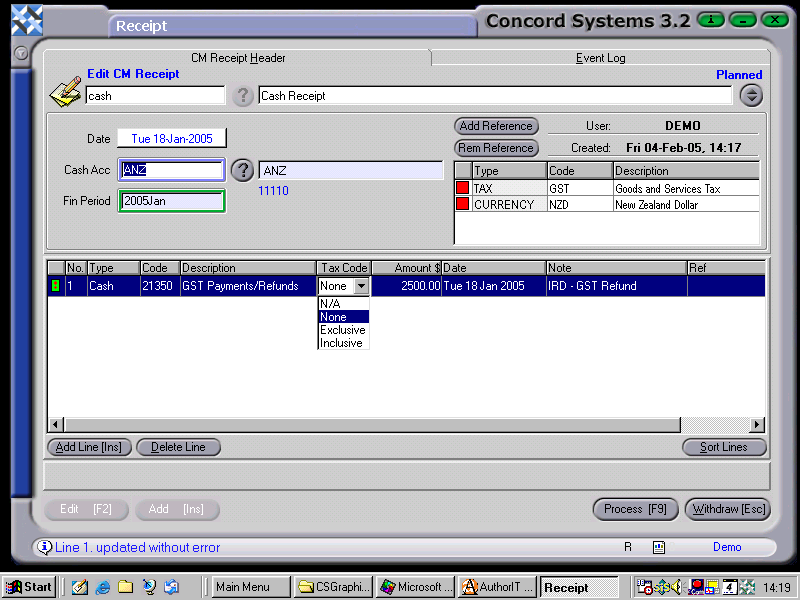
The method for entering a Receipt <R>, is as follows:
For a new receipt, Add [INS].
Enter the name of the payer.
Save [F9].
Enter the following details:
Date. This will default to the current date. To select the actual date of the receipt (if it differs), click on date. To change the day, use the [up/down arrow keys] . To change the month, use the [up/down arrow keys + shift key].
Cash Acc. Ensure that this is set to the correct bank account, if the is more than one. To change if required, click on the ? button and select.
Ensure that the Tax and Currency references have appeared at the right of the screen, if not, proceed as follows:
Click on Add Reference.
Click on the down arrow to select Tax or Currency.
Click on the code box and use the [up/down arrow keys + shift key] to select as required (currency will usually always be NZD)
Add Line [INS] and enter the following details:
Type. This will default to Cash (as in Cash Receipt), but can be changed if required, by clicking on the arrow within the box, and selecting.
Code. This is the General Ledger account that the receipt will be credited to. This may be entered directly in, or if unknown, searched by clicking and using the [up/down arrow keys + shift key].
Amount. Enter in the amount of the receipt. This may be the total amount, or net amount depending upon the selection made in the subsequent Tax Code box.
Tax Code. The selections available by clicking on the arrow within the box, are Not Applicable, None, Exclusive or Inclusive. Select appropriately.
Amount %. Use to record a discount.
Date. Change if the date to be recorded differs from the header date.
Note. Complete if required.
The GST amount should then be calculated accordingly and the transaction is ready to be processed [F9], or withdrawn [Esc] if incorrect.
7. Process [F9] and select from the following options:
Process, by completing immediately. The receipt will be completed and confirmed and unable to be edited. The automatic journal will be completed.
Debit Bank
Credit GST
Credit General Ledger A/c
Hold, and do not complete immediately. No journal will be completed and the receipt is able to be edited.
Delete.
A number of lines may be inserted within the one transaction before processing. It is recommended that they be the same type of transaction eg. all GST exclusive, or all exempt.