The procedure for creating a new Budget within Concord is as follows:
Add [INS]
Code. Enter a 'code' or short description of the new Budget.
Description. Enter a longer description. This must be completed.
Save [F9].
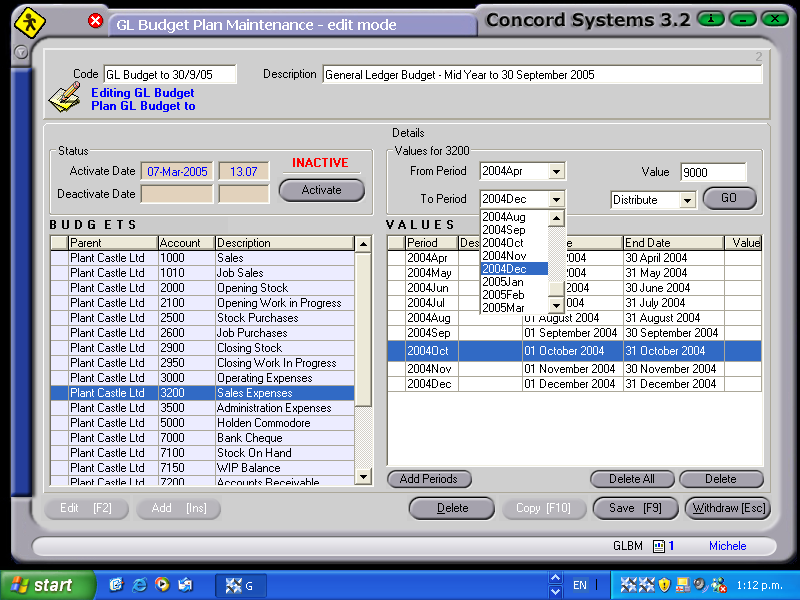
Enter period details for the Budget to apply to.
From Period
To Period
Enter Budget data.
Select by clicking on the General Ledger account number within the lefthandside table, to enter details.
Click on the icon "Add periods"
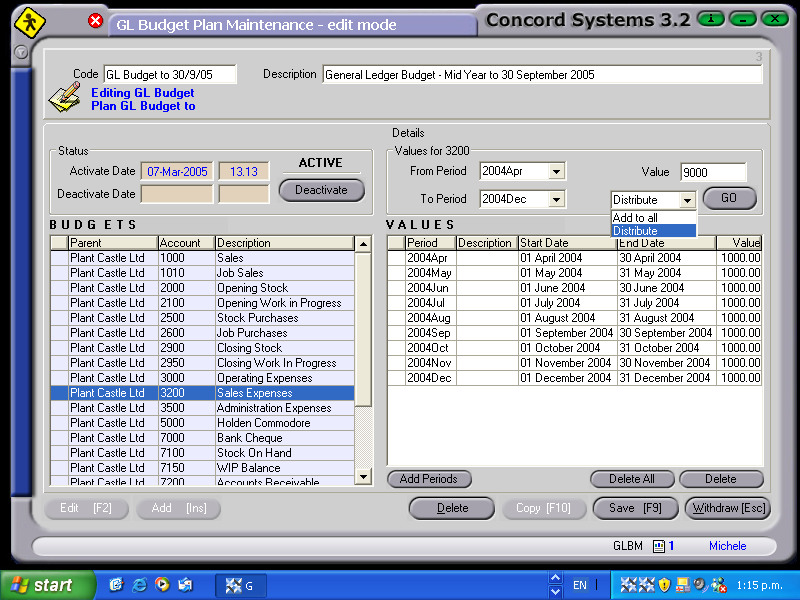
Value. Enter the $ value in the Value box. When entering the total year's figure, click on the "Distribute" selection. This will allocate the total amount evenly between the periods. When entering a monthly figure, click on the "Add to All" selection. This will allocate the amount specified to each period.
Click on the GO icon.
Save [F9].
If the Budget figure for an account is not to be evenly distributed between the periods, the periods should be selected individually to enable the correct figure to be entered.
When the Budget has been completed satisfactorily, it may be ACTIVATED, by clicking on the 'Activate' icon.