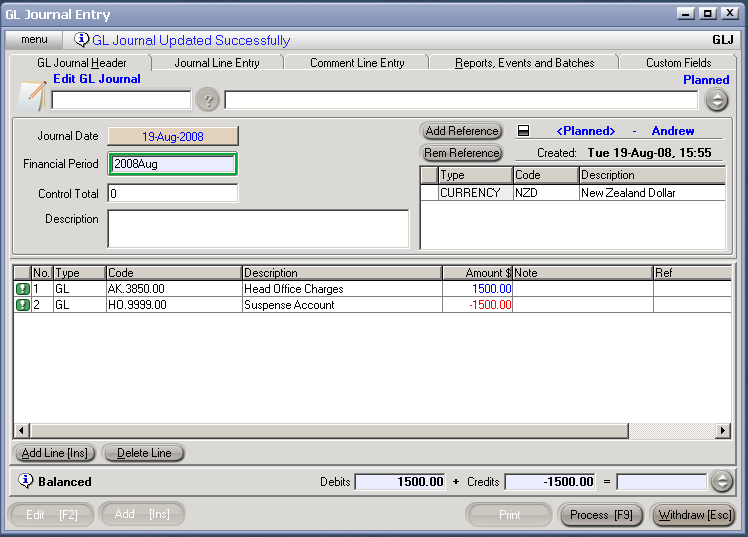
The procedure for entering a General Journal <GLJ>, is as follows:
For a new journal, Add [INS].
Enter the journal’s reference number.
Save [F9].
Date. This will default to the current date. To select the actual date of the payment (if it differs), click on date.To change the day use the [up/down arrow keys]. To change the month, use the [up/down arrow keys + shift key].
Description. Enter a description of the transaction if required.
Currency Code. Ensure that a currency code is entered in the reference table, otherwise the journal will not be able to be processed.
Simply click on currency code and use the [up/down arrow keys + shift key] to select as required. (currency will usually always be NZD).
Add Line [INS] and enter the following details:
The General Ledger account number to be debited or credited. Once this has been entered, the description will automatically appear.
Amount. If a credit is being entered, use a minus sign before the amount.
Enter any notes as and/or references as required.
Repeat this process for the corresponding debits or credits. At the bottom right of the screen, the total of the debits and the total of the credits will accrue. If the totals of the debits and credits are the same, and the net total is zero, the journal may be processed [F9]. If the debit and credit totals do not agree, the difference will be displayed and the journal cannot be processed until the error has been corrected.
8. Once Process [F9] has been selected the options are:
Process, by completing immediately. The journal will be completed and confirmed and cannot be edited.
Process but do not complete immediately. The journal will be confirmed but not completed and can be edited by creating a new version.
Hold, and do not complete immediately. the journal is held in a Planned state and is able to be edited.