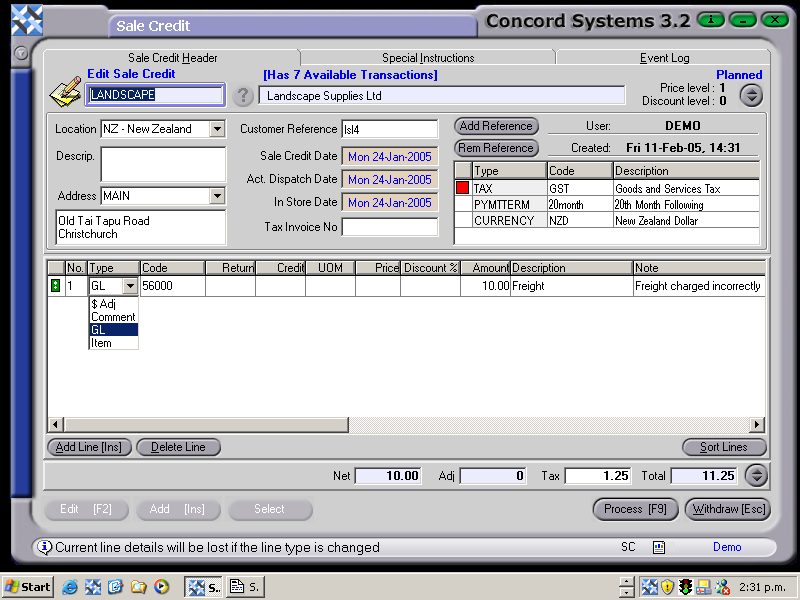
The procedure for issuing a Sale Credit for a non-stock item is as follows:
Select a customer, by either entering in the name, clicking on the ? button and selecting [F3], or click on 'customer' and use the [up/down arrow keys] to select.
Add [INS].
Customer Reference. Enter details if necessary.
Date. Will default to the current date. To change the day, use the [up/down arrow keys].To change the month, use the [up/down arrow keys + shift key].
Tax Invoice Number. This will be automatically allocated once the transaction is Confirmed and Completed.
Enter the following details:
Type. Click on the down arrow and select GL (General Ledger).
Code. Enter the General Ledger code (eg. Sales). If this is unknown, use the [up/down arrow keys + shift key] to select.
Amount. Enter the GST exclusive amount.
Note. Enter if required.
7. Process [F9] and select from the following options:
Process and Complete Immediately. The transaction will be processed as confirmed and completed and will be unable to be edited. The automatic journal entry will also be processed.
Process, but do not Complete Immediately. The transaction will be processed as confirmed, and will be unable to be edited unless a version of the transaction is used. The automatic journal entry will not be processed.
Hold. The transaction will remain in a 'Planned' state and will be able to be edited.
Delete.
A tax invoice number will be automatically allocated once Processing is complete.