Sale Credit (Raised from Sale Invoices) for stock items
The Customer has been sent and invoiced for incorrect items (ie. Reversing a Completed and Confirmed Sales Invoice).
The procedure for issuing a credit is as follows:
Select a customer, by either entering in the name, clicking on the ? button and selecting [F3], or click on 'customer' and use the [up/down arrow keys] to select.
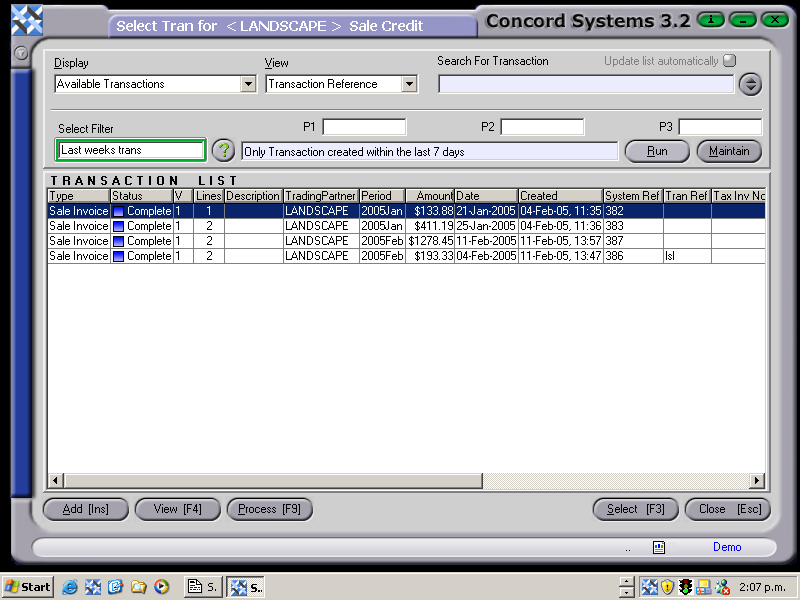
Select [F3]. A list of the customer's transactions available for selection will appear. Highlight the original invoice that the credit relates to and click to Select [F3].
For large volumes of transactions, narrow the search parameters by selecting one of the following options:
Displaying Current History.
Viewing System Reference.
Clicking in the 'Search for Transaction' box and entering the original invoice number.
The search can be narrowed further by selecting further filters by clicking on the up arrow of the up/down arrow icon at the top right of the screen, then selecting "Run".
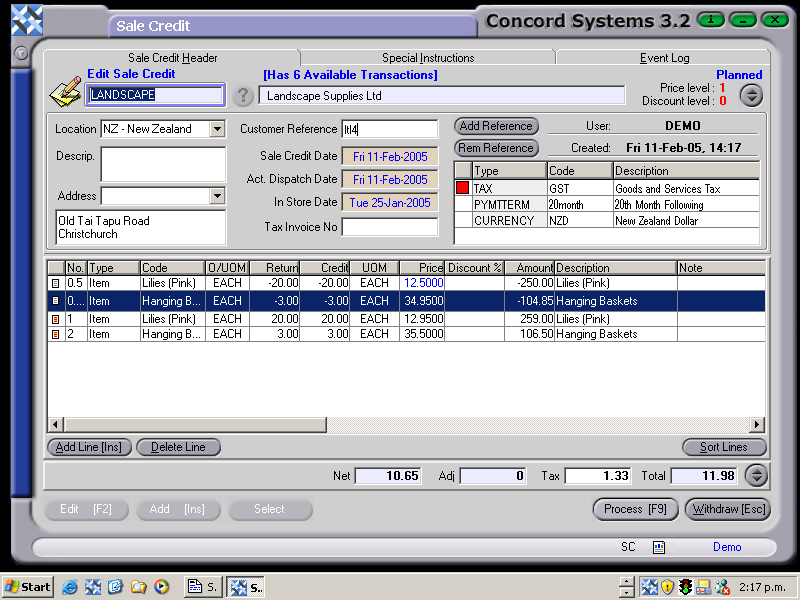
Once an invoice selection has been made, details of the original invoice will be imported into the Sale Credit.
3. Process [F9], and choose from the following options:
Process and Complete Immediately. The transaction will be processed as confirmed and completed and will be unable to be edited. The automatic journal entry will also be processed.
Process, but do not Complete Immediately. The transaction will be processed as confirmed, and will be unable to be edited unless a version of the transaction is used. The automatic journal entry will not be processed.
Hold. The transaction will remain in a 'Planned' state and will be able to be edited.
Delete.
A tax invoice number will be automatically allocated once Processing is complete.
Customer has been charged incorrect price for items.
The procedure for issuing a credit is as follows:
Select a customer, by either entering in the name, clicking on the ? button and selecting [F3], or click on 'customer' and use the [up/down arrow keys] to select.
Select [F3]. A list of the customer's transactions available for selection will appear. Highlight the original invoice that the credit relates to and click to Select [F3].
For large volumes of transactions, narrow the search parameters by selecting one of the following options:
Displaying Current History.
Viewing System Reference.
Clicking in the 'Search for Transaction' box and entering the original invoice number.
Once selection has been made, details of the original invoice will be imported into the Sales Credit.
3. Check that the correct invoice has been imported and the Sales Credit header details are correct, then Edit as follows:
Add Line [INS]
Click on the Credit box and enter the volume of items involved using negative figures.
Click on the Price box to enter the correct price per item.
Refresh the Net Amount figure at the bottom of the screen.
4. Process [F9], selecting from the options demonstrated in the above section.
A Tax Invoice number will be issued automatically.
Customer has been sent incorrect amount of items, and has returned some but not all of the items.
The procedure for issuing a credit is as follows:
Select a customer, by either entering in the name, clicking on the ? button and selecting [F3], or click on 'customer' and use the [up/down arrow keys] to select.
Select [F3]. A list of the customer's transactions available for selection will appear. Highlight the original invoice that the credit relates to and click to Select [F3].
For large volumes of transactions, narrow the search parameters by selecting one of the following options:
Displaying Current History.
Viewing System Reference.
Clicking in the 'Search for Transaction' box and entering the original invoice number.
Once selection has been made, details of the original invoice will be imported into the Sales Credit.
3. Check that the correct invoice has been imported and the Sales Credit header details are correct, then Edit as
follows:
Highlight the appropriate line by clicking on it.
Click on the data to be changed and edit accordingly.
If an item is not applicable to the Sales Credit, highlight and click on Delete Line.
Refresh the total of the credit by clicking on the net amount.
4. Process [F9], selecting from the options demonstrated in the above section. A Tax Invoice number will be issued