The following information is required before proceeding with the creation of a new General Ledger Account code.
The type of account (Balance Sheet, Profit & Loss or Non-Financial)?
The account code (number ) to be used.
Once this information is available, proceed as follows:
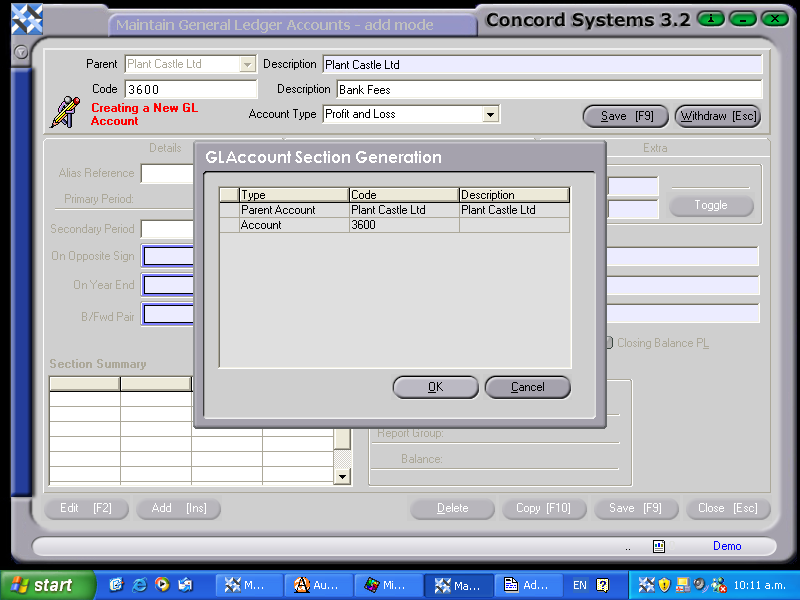
Ensure that the Parent Account is set correctly. It will default to the usual one.
Add [INS].
Enter in the new account number. If this has not been pre-determined, click on the ? button to view existing account numbers.
Click on Description and enter in the account name.
Click on the down arrow in the Account Type box and select either Balance Sheet, Profit and Loss or Non-Financial.
Save [F9].
OK. The new record should have been be created successfully.
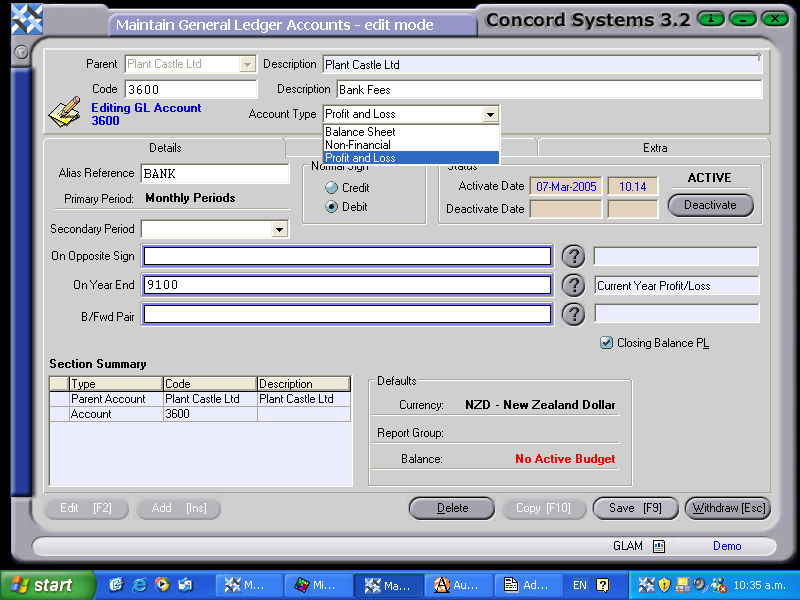
Enter any further information required, in the details screen, as shown below:
The information that should be ensured is correct, is
The correct “Normal Sign” box is selected.
The Account is showing as “ACTIVE”. This may involve adding Group References (depending on the configuration for General Ledger). See "Group References" section, later in this document.
The Year end account is shown, ie in the case of a Profit and Loss account, the balance of the account should be included in the Year End Profit and Loss Account.