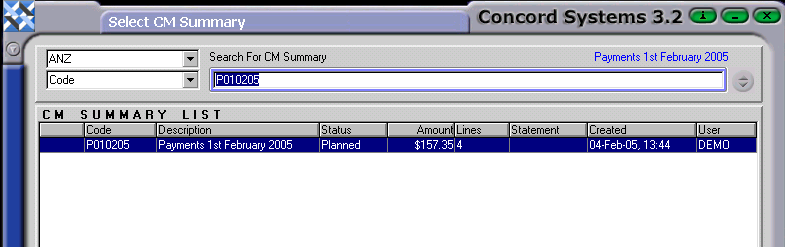
To view a Cash Summary which has been completed and confirmed and can no longer be edited, the procedure is as follows:
Click on the ? on the second top left hand side box.
Select the correct Bank Account, by clicking on the down arrow key on the top left hand side box and click to highlight.
This will bring up the list of summaries created for that bank account. This is the Cash Line Summary List screen, which can also be accessed through the quick key <CSL>.
Click on the appropriate Summary required to be viewed and then click Select [F3] or View [F4].
To narrow the search field, type in the code, which will highlight the summary automatically. Once again, click either Select [F3] or View [F4]
Adding or Amending Bank Account Details
By initially clicking on the ? on the top left hand side box, instead of the second one, the function Cash Account List <CAL> will automatically appear, which allows an Add or Edit of Bank Account details through the function <CAM>.
For further information on these procedures, refer to the sections "Cash Account List" and "Cash Account Maintenance".