The Bill of Materials (also referred to as a 'Recipe') is created and maintained within the "Item BOM Component Maintenance" <IBCM> function.
To create a new Bill of Materials Item Build, the procedure is as follows:
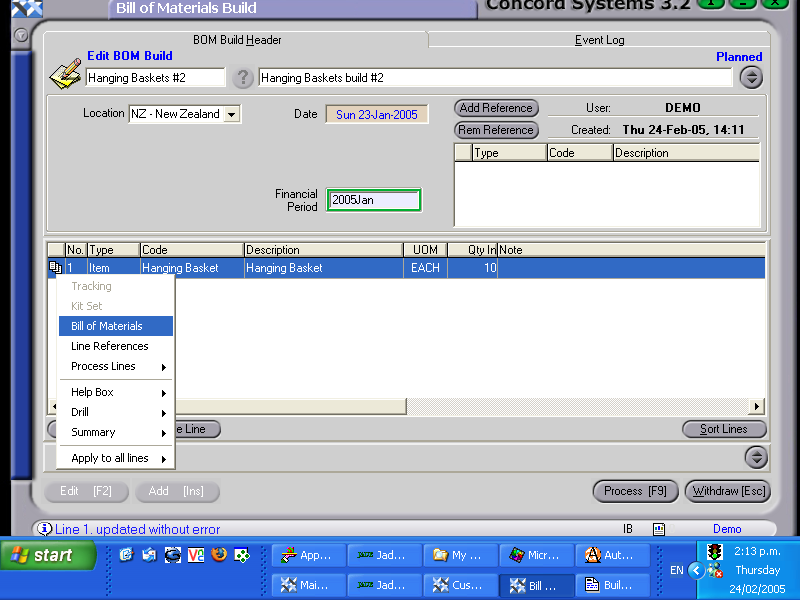
Initiate the Build transaction on the Item Build screen <IB>.
Add [INS]
Type in the short name or reference number of the Item Build.
Type in a long description if required.
Save [F9].
Location. Ensure the correct location is selected, as the components required for the Item Build will be issued from the chosen location. Click on the down arrow key and select.
Add Line [INS]. Proceed with adding details of the item build required. Listed below are the columns that must be completed. Other columns may be completed if required. To select the columns for data to be entered, right click on the column table headings, select Columns, and turn on or off the headings required.
Type. Click on the down arrow key to select either "Item" or "Comment". (Comment may be an instructional comment).
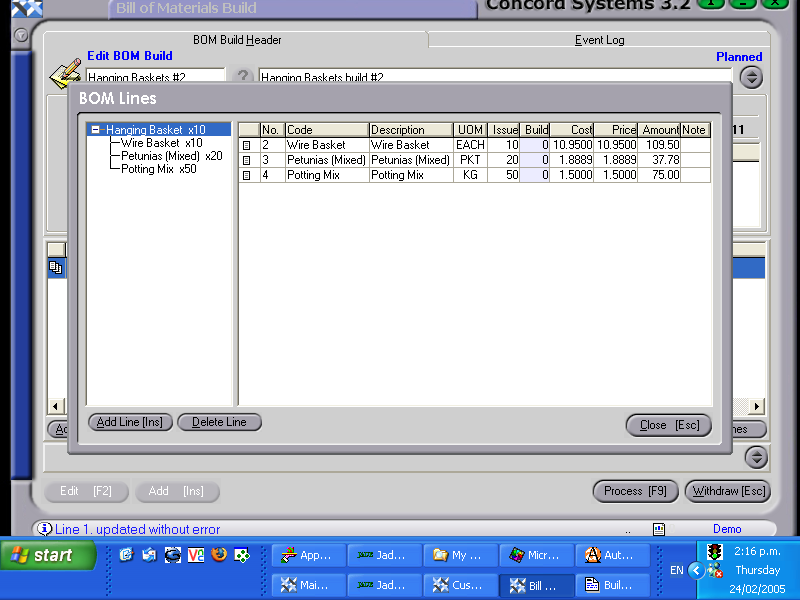
Code. Enter in the Item Code. If the code is unknown, use the [up/down arrow keys + shift key] to select. The item selected is usually preceded by a multi-page symbol to the left of the line number. This indicates that there exists a Bill of Materials Component "recipe" for this item. By right clicking on this symbol, and then selecting "Bill of Materials", the quantities of items required for the build will be displayed in a table. (NB. The quantities required will relate to the quantity of the item being built).
UOM. The default Unit of Measure will automatically appear.If there is more than one UOM for the item, use the down arrow key to select.
Quantity. Enter the required quantity of the item being built. Several items can be entered under the one reference number.
8. Process [F9]. The options available are:
Process, but do not complete immediately - The item build will be confirmed but not completed, and will be able to be edited by creating a new version.
Process and complete immediately - The item build will be confirmed and completed and will be unable to be edited.
Hold - The item build will remain planned and will be able to be edited.
Delete - The item build will be deleted.
A document may also be created during the Item Build process, by clicking on the box next to "Bom Build" and sending it to the destination of either the screen or printer.
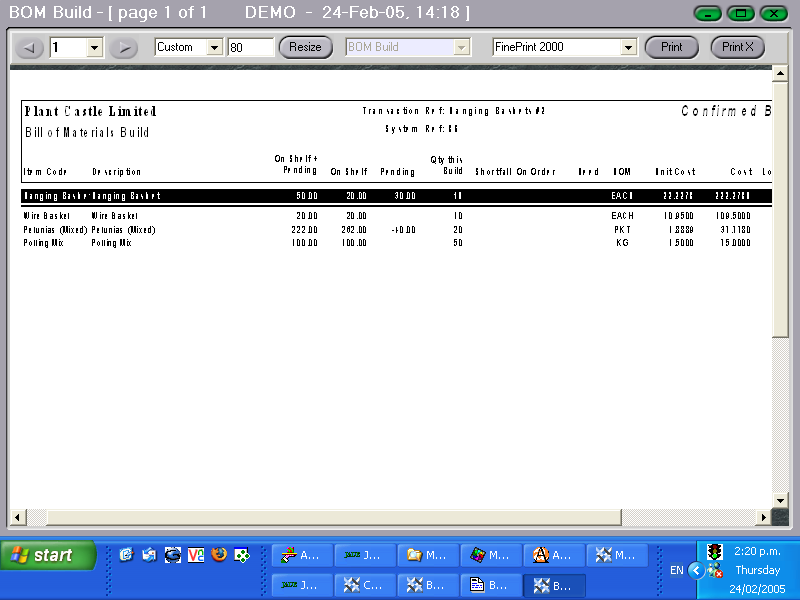
It is recommended that Option 3. be chosen initially. A Bill of Materials document will be printed out to ensure that there is stock on hand available, of the components required for the build to proceed. An example of the Bill of Materials document is shown below.
The line highlighted in black is the item being built and entered into stock. In this case it is Hanging Baskets, and ten are being built. Listed underneath are the components necessary for the build, the quantity required of each and the available stock on hand. If an item has a quantity displayed in the "Shortfall" column this indicates that there is not enough stock on hand of the item, available for the build.
A decision needs to be made to either:
Cancel the build
Order more stock of the component, and proceed with the build when the stock arrives into store.
Adjust the "recipe" of the build, by editing the quantities of the components required for the build under the function "Item BOM Component Maintenance" <IBCM>.
The outcome of the decision made, will determine the Processing option for the Item Build as discussed earlier in this section.