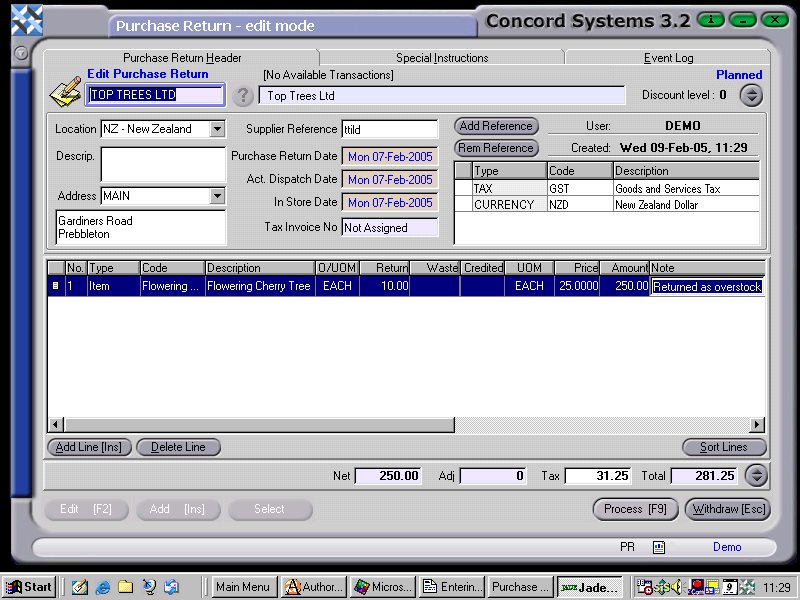
A Purchase Return transaction may be required, if incorrect items have been sent by the supplier.
The procedure for returning goods using the Purchase Return <PR> function, is as follows:
Select Supplier. Enter the Supplier name in the box, or click on the ? button for the Supplier List. Click to highlight and Select [F3].
Add [INS].
Location. Ensure the correct location is showing for the goods being entered into store. Use the [down arrow key] to select a different location if necessary.
Supplier Reference. Enter if Required.
Purchase Return Date, Actual Dispatch Date, In Store Date. To change the day, use the [up/down arrow keys]. To change the month, use the [up/down arrow keys + shift key].
Add Line [INS], and enter details as necessary. Below are the minimum details required to be entered.
Type. Use the down arrow key to select "Item".
Code. Enter the item code, or use the [up/down arrow keys + shift key] to select.
Description. This automatically appears once the code has been entered.
Return. Enter the quantity of the item which is being returned.
UOM. The Unit of Measure automatically appears when the item code is entered, although if there is more than one unit of measure available for the item, click on the down arrow key to select the appropriate one.
If further details are required to be entered, right click on the column headings, select "Columns" and turn on or off the desired categories.
7. Process [F9]. The options are as follows:
Process. This will confirm the transaction, and will remove items from stock on hand figures. The transaction will not be completed, in case a Purchase Credit is required to be raised from this Purchase Return. The transaction will still be able to be edited by creating another version.
Hold. No stock figures will be adjusted, and the transaction will remain in a 'Planned' state and is able to be edited.