A Sale Dispatch transaction can be raised from a pre-prepared Sale Order, which has already been sent to the customer.
The procedure is as follows:
Select Customer. Enter the Customer name, or click on the ? button for the Customer List, then click to highlight and Select [F3].
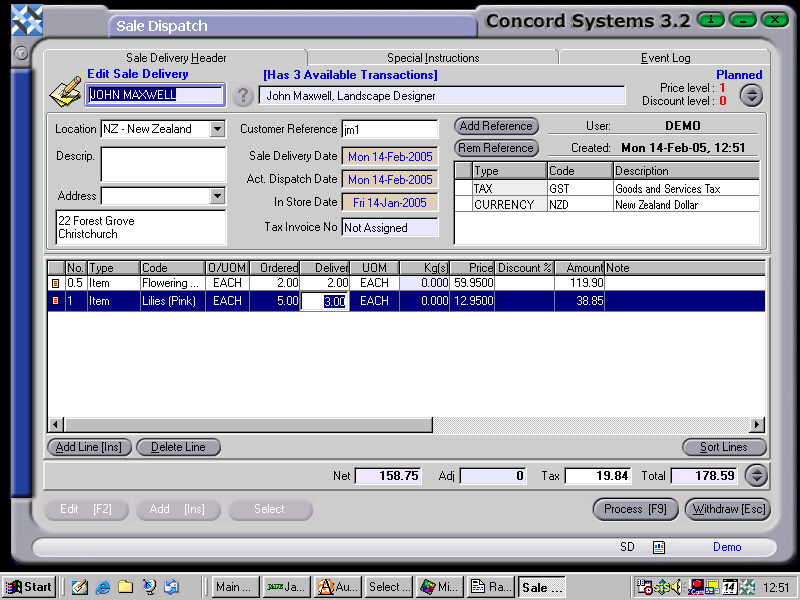
Customer Reference. This must be completed.
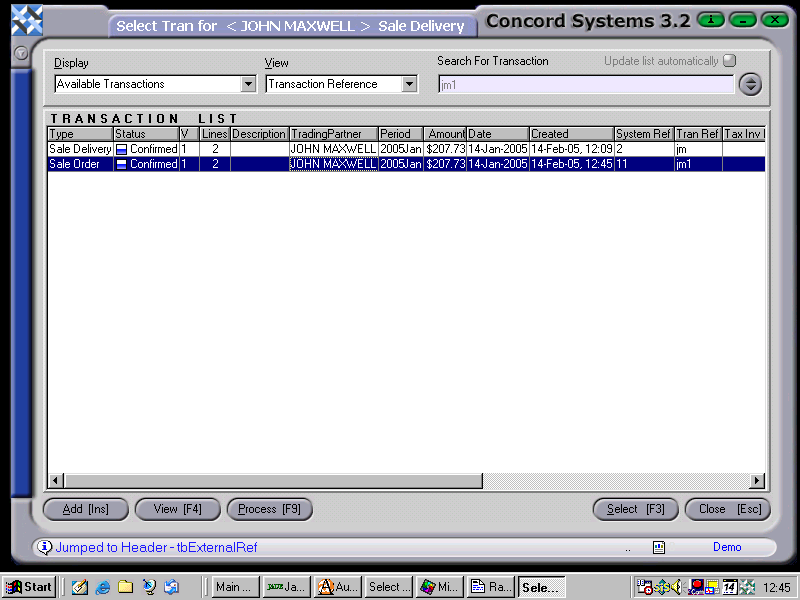
Click on the "Select" button at the bottom of the screen. A list of available transactions that are available for the Sale Dispatch to be raised from, will appear.
Click to highlight on the appropriate Sale Order and Select [F3].
This will automatically recall the items which have been requested on the Sale Order. If there are any differences in quantity between the items ordered and the items being delivered, click on the box in the "Delivered" column and enter the correct quantity to be delivered.
Further lines may also be added for items not originally on the Sale Order, by clicking on Add [INS] and entering details as required.
5. Location. Ensure the correct location is being used. Click on the down arrow key to change if necessary.
6. Sale Dispatch Date, Actual Dispatch Date, In Store Date. To change the day, use the [up/down arrow keys], to change the month, use the [up/down arrow keys + shift key].
7. Process [F9]
Process and Complete Immediately. If all items on the Sale Dispatch are being delivered exactly as the Sale Order has requested, and there are no adjustments, it may be completed immediately. "Close Source" may be selected, being the original Sale Order. This will have the effect of completing the Sale Order, and no further documentation will be able to be raised from it. This will also have the effect of completing the Sale Dispatch and no further documentation, such as a Sale Invoice will be able to be raised from it.
Process, but do not complete immediately. This will allow a further version of the transaction, but the original transaction will stay Confirmed but not Completed, and another document such as a Sale Invoice will be able to be raised from it.
Hold. The Sales Dispatch will be held in a 'Planned' state and further edits are able to be made.