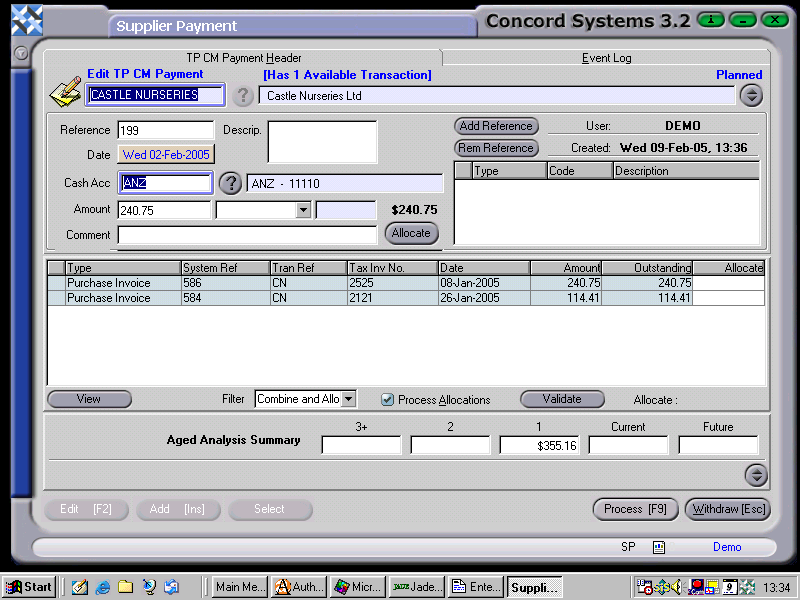
The procedure for entering a Supplier Payment is as follows:
Select a supplier, by either entering the name, clicking on the ? button and selecting, or clicking on 'Supplier' and using the [up/down arrow keys].
Add [INS] to enter a new payment.
Enter the following details:
Reference. Enter for example, the cheque number or bank statement page number.
Date. This will default to the current date. To select the actual date of the payment (if it differs), click on date. To change the day, use the [up/down arrow keys]. To change the month, use the [up/down arrow keys + shift key].
Cash Acc. Ensure this is set to the correct bank account, if there are more than one. To change if required, click on the ? button and select.
Amount. Total amount of payment.
Comment. Enter if required.
To allocate a Supplier Payment to outstanding invoices within this screen, refer to the instructions set out under the section "Allocating a Supplier Payment", within this chapter.
Process [F9]. The options are as follows:
Process and Complete Immediately. The transaction will be processed as confirmed and completed and will be unable to be edited. The automatic journal entry will also be processed.
Process, but do not Complete Immediately. The transaction will be processed as confirmed, and will be unable to be edited unless a version of the transaction is used. The automatic journal entry will not be processed.
Hold. The transaction will remain in a 'Planned' state and will be able to be edited.