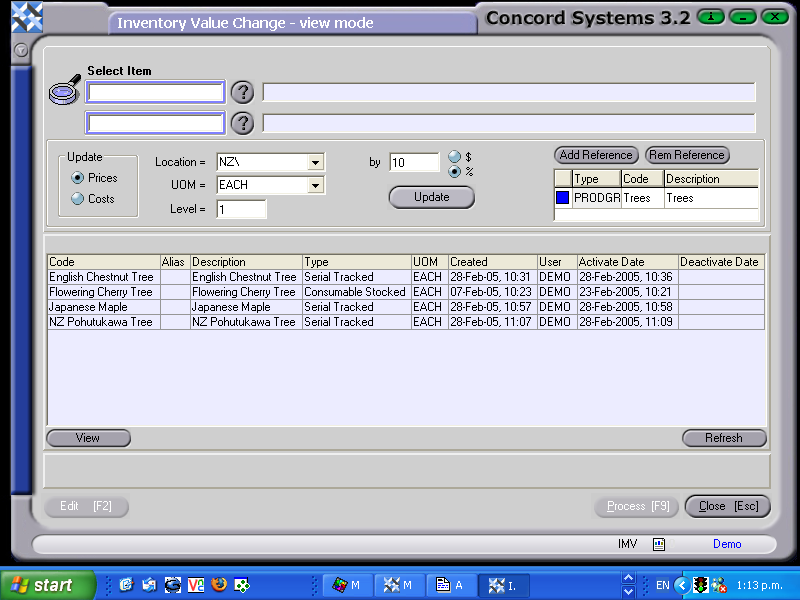
To apply a value change to a group of items the procedure is as follows:
Selecting the items. This can be done in one of two ways:
From Item to Item. Enter the Item reference number in the first "Select Item" box. If unknown, click on the ? button. Click to highlight and Select [F3]. Repeat this procedure for the "To Item" box. The items for change will be between and including the selected items.
Within a Group Type. Use the Reference table to select
Type. Click on Type and use the down arrow to select the Group Type. eg. Product Group
Code. Use the [up/down arrow keys + shift key] to select the Group Type Code.
Once the selection of items has been made, click on the Refresh button at the bottom of the screen to display the list of items selected.
Elect to update 'Price' or 'Costs'. Other filters which can be used to narrow the parameters of the item selection are:
Location, Unit of Measure, Level. Select as required.
% or $. Is the global change a percentage or dollar figure. Select and enter the value.
Update. Click on this icon. If the update is completed successfully, the message will read "Update completed without error". An example of a global price change for a Product Group is demonstrated below: