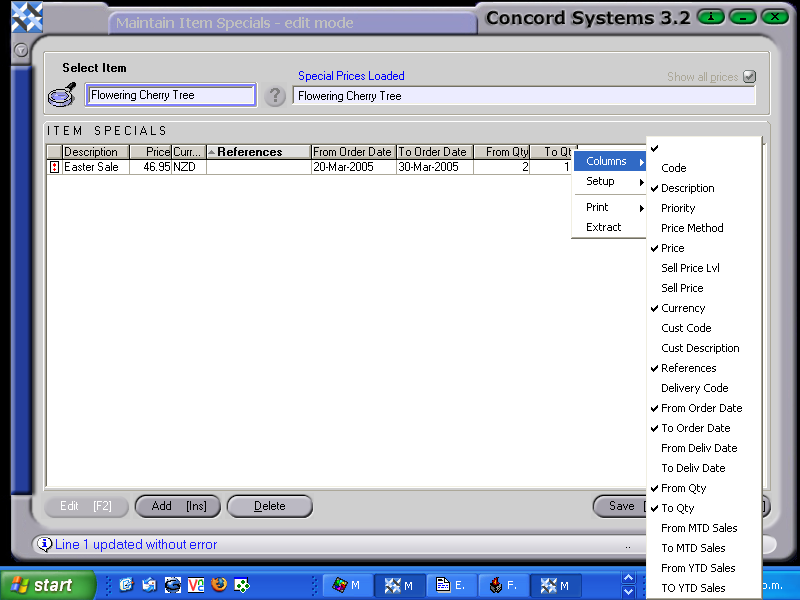
To enter a Special Price against an Item, the procedure is as follows:
Select Item. Either enter the item code or, use the [up/down arrow keys] to locate or, click on the ? button for the Item List. Click to highlight and Select [F3].
Ensure the "Show all prices" icon is selected.
Edit [F2].
Add [INS].
The following details must be entered.
Description. Enter details of the special price eg. Christmas special
Price.
Other details which may be entered are:
Sell Price Level. If a Sell Price level is entered, it indicates the special price that will apply is that Sell price level, and not any special price entered in. Customer Code. If left blank, the special price would apply to all customers. If a customer is specified the sell price would apply to that customer only.
References. Different group types may be selected for the special price to apply to. eg. Customer category, Sales area
From/To Delivery Date. A date entry would specify particular dates that the special price would apply to. Use the [up/down arrow keys + shift key] to enter. To leave blank indicates the special price is for an indefinite period.
From/To Quantity. If amounts are entered, the special price would only apply to those quantities purchased. To leave blank indicates the special price has no minimum or maximum quantity limit.
Save [F9].
By selecting a combination of the above details, a special price for an item should accurately target the required customer/s.