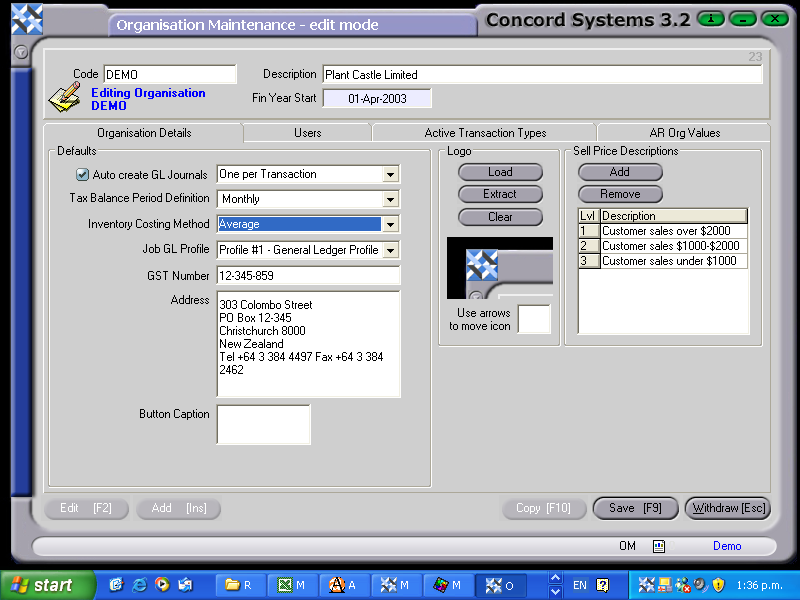
Adding or editing an existing Organisation's details
Adding a new Organisation
To add details of a new organisation, the procedure is as follows:
- Add [INS].
- Code. Enter the name of the organisation.
- Description: Enter as required.
- Financial year Start: Use the [up/down arrow keys] to change the day, or the [shift + up/down arrow keys] to change the month.
- Save [F9].
- Enter the data as set out in the section below "Editing", point number 2.
- Save [F9].
Editing
To edit an existing Organisation's details into Concord, the procedure is as follows:
- Click on the "Viewing Organisation" box and use the [up/down arrow key] to select.
- Edit [F2] the following information as required.
- Auto Create General Ledger Journals. Yes/No. Use the down arrow to select required frequency.
- Tax Balance Period Definition. Use the down arrow to select.
- Inventory Costing Method. Use the down arrow key to select method.
- Job General Ledger Profile. Use the down arrow key to select profile.
- GST Number. Enter in IRD number.
- Address. Enter in address.
- Button Caption ????
- Logo. An Organisation's logo can be imported to appear on the screen functions, and can be positioned on the screen to give the desired effect.
- Sell Price Descriptions. Price level structures may be set up by adding or removing levels.
- Save [F9].