Previous Topic

Next Topic

Book Contents

Book Index

Editing an existing Tax Code

To edit an existing tax code, the procedure is as follows:
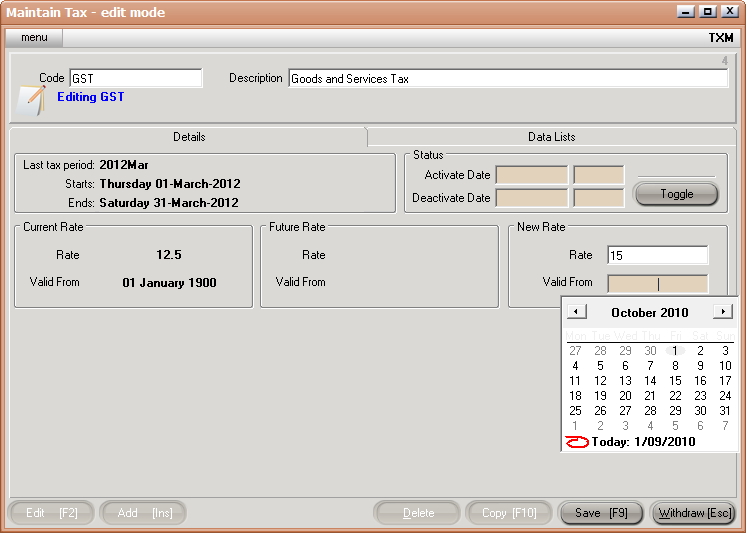
  1. Select Tax Code. Either, enter in the tax code, use the [up/down arrow keys], or click on the ? button to the right of the tax code for the Tax List and Select [F3].
  2. Edit [F2].
  3. Enter the new Tax Rate and the date it comes into effect.

CS Screenshot - linked

Once you have saved the change (Save button or F9 key) you will see the current rate and the future rate displayed on the front details sheet.
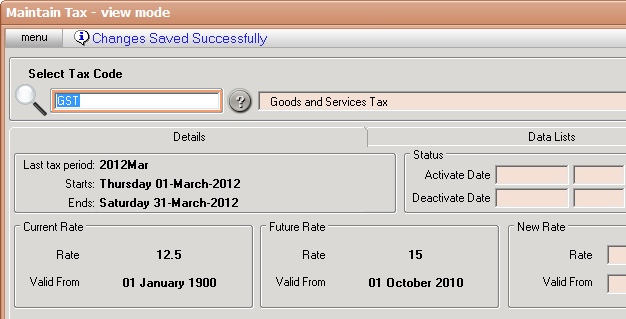
CS Screenshot - linked

The date entered onto the transaction is used to locate the appropriate tax rate, that is, it is not based on the day you are keying the Quote/Order/Invoice.

See Also

Tax Maintenance <TXM>

Creating a new Tax Code

Tax Maintenance Data Lists

Tax List <TXL>