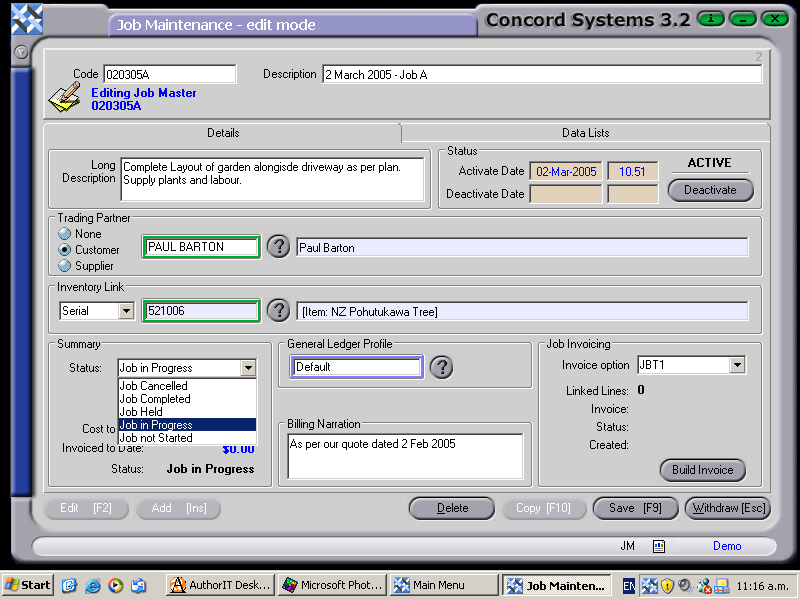
The procedure for creating a new Job within Concord, using the Job Maintenance <JM> function is as follows:
Add [INS]
Code. Enter the new Job Code. This must be a unique code. (If unsure of the job codes used to date, refer to the Job List <JL> for existing job codes).
Description. This must be entered.
Save [F9].
Details. Enter the following:
Long Description. Optional entry.
Trading Partner. This is the ability to link the Job to a Customer, Supplier, or None. Select as required, then click on the ? button to provide the Customer or Supplier List and Select [F3], or use the [up/down arrow keys] to scroll and select.
Inventory Link. This is the ability to link the job to a stock item by selecting Batch, Item, Serial or None as required, then click on the ? button to provide the Batch List, Item List or Serial List and Select [F3], or use the [up/down arrow keys] to scroll and select.
Job Status. Will default to "Job in Progress".
General Ledger Profile. Will default to "Default General Ledger Profile", but to change if required, click on the ? button to select another profile.
Job Invoicing. Select from the templates that will have previously been set up under the function <JBM> - Job Billing Template Maintenance.
Billing Narration. Enter if a narration is required on the invoice.