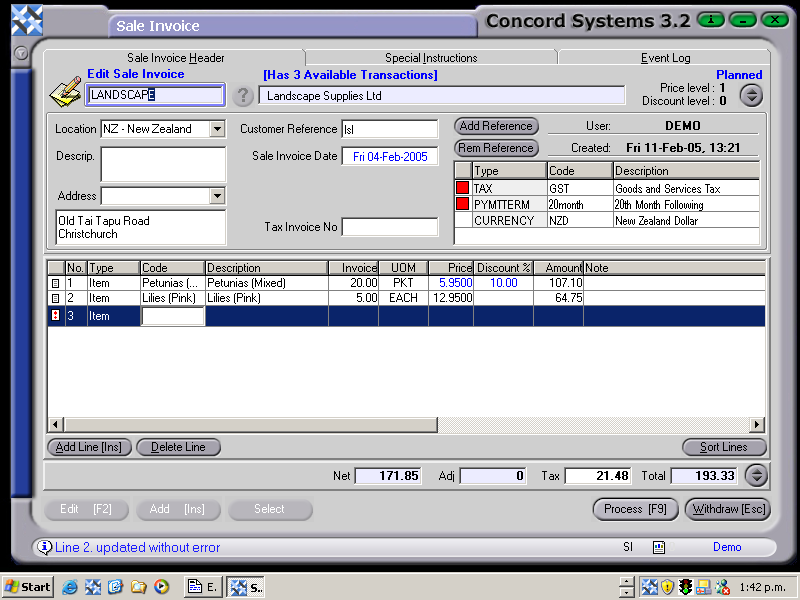
A Sale Invoice may only be edited if it is in an incomplete state. ie. It is being held as 'Planned' or 'Confirmed'.
To edit a Sale Invoice (either stock or non-stock) the procedure is as follows:
Select a customer, by either entering in the name, clicking on the ? button and selecting, or click on customer and use the [up/down arrow keys] to select.
Select Invoice. Click on the 'Select' icon at the bottom of the screen. A list of selected customer's transactions available for editing, will appear. Click on the required transaction and Select [F3].
Edit details as required, by clicking on the boxes to highlight, and amend accordingly. Lines can also be Added [INS] or Deleted.
4. Process [F9] and select from the following options.
Process, by completing immediately.The invoice will be confirmed and completed and cannot be edited. The automatic journal will also be completed.
Process but do not complete immediately. The invoice will be confirmed, and will be unable to be edited by the creation of another version of the transaction. No journals will be completed.
Hold. The invoice will remain in a 'Planned' state and will be able to be edited.