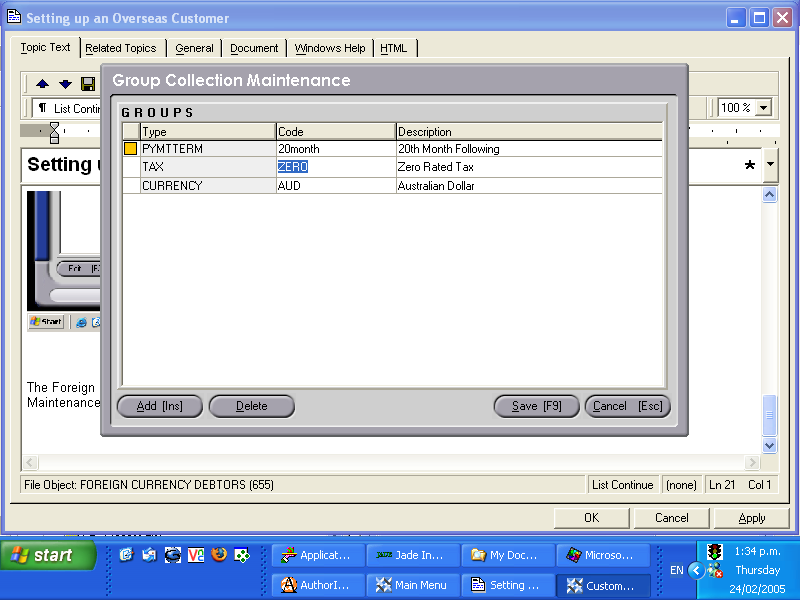
An overseas debtor being invoiced, and paying in a foreign currency must be set up correctly in Concord to ensure transactions are recorded correctly. Within the Customer Maintenance <CM> function, the correct 'References' need to be selected.
Currency
Select appropriate customer.
Select 'References' from the Data List menu.
Click on the Modify button.
Select the Group Type 'Currency', by clicking on the down arrow button.(The Group Types available should have previously been set up under Group Maintenance <GM>. Click on 'Code', (within the reference table) and use the [up/down arrow keys + shift key] to select the required currency.
Save [F9].
2. Tax. The customer's tax code should be set to 'zero-rated'.
Select appropriate customer.
Select 'References' from the Data List menu.
Click on the Modify button.
Select the Group Type 'Tax' by clicking on the down arrow button. Click on 'Code' (within the reference table) and use the [up/down arrow keys + shift key] to select 'zero-rated'.
Save [F9].
These steps are demonstrated below:
The Foreign Currency 'spot rates' are also required to be set up correctly. Refer to the chapter 'Foreign Exchange Maintenance' <FCM> for details of this procedure.