


|
|
|
|
|
In order for the Customer Receipt to be processed correctly, ensure a Foreign Currency Realisation (FX Realisation) Account set up in the General Ledger. (Refer to the section within this chapter).
The procedure for processing a Foreign Currency Customer Receipt is as follows:
It is ideal to wait until the bank has converted the foreign currency receipt into $NZ before entering the receipt into Concord. Therefore, the amount receipted should be entered in $NZ.
By viewing the allocations on the customer receipt <CR> screen, choose the appropriate invoice number the customer is paying, and the $NZ value that the customer was billed at on that invoice. The difference between the converted $NZ the customer has paid and the $NZ value the customer was billed, should be entered into an account called ‘Foreign Currency Realisation’ (FX Realisation).
For example.
The total invoice value is AUD $23.61, which is the equivalent of NZ $23.65
The customer pays the converted value of NZ$23.65
The amount entered into the FX realisation is -$1.04
This is demonstrated on the diagram below.
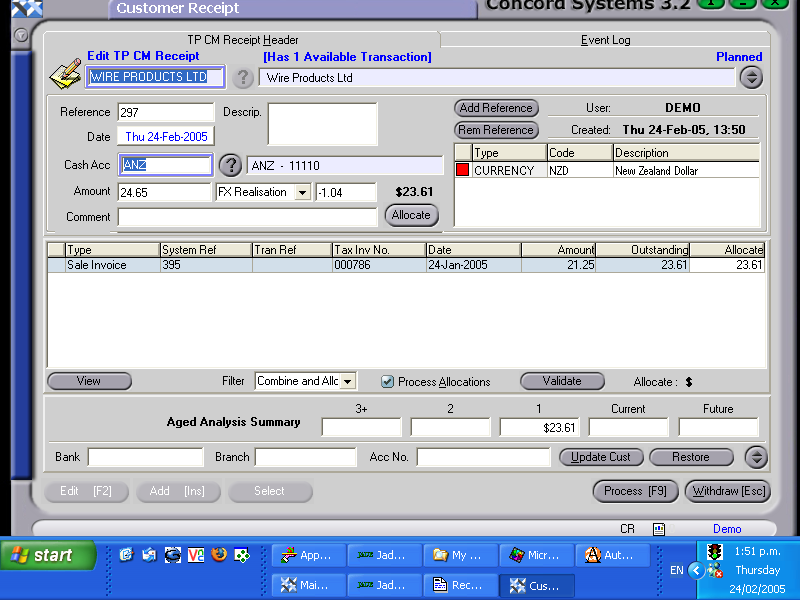
By entering the difference into the FX Realisation account, the following entries will be correct.
The FX Realisation account will remain as an amount in the Profit and Loss statement.