


|
|
|
|
|
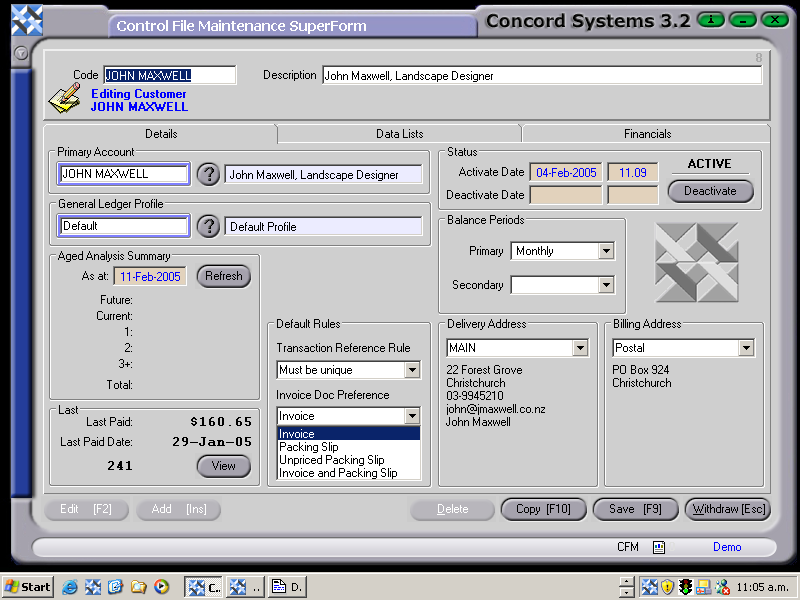
Certain fields under the 'Details' screen are available to be edited, while others are for viewing purposes only. The fields that are able to be edited by clicking on the Edit [F2] button, are as follows:
Primary Account.
(Also known as Parent Account). For example, if the customer has more than one branch, and there is a head office responsible for paying accounts, the relevant data may be entered here.
General Ledger Profile.
These would have previously been created in General Ledger Profile Maintenance <GLPM>. Generally there would be a default General Ledger Profile which would cater for most customers. However, this can be modified as required, by clicking on the ? button and selecting [F3] the appropriate code from the table.
Default Rules.
These govern the fields required to be completed during processing of transactions for a customer.
Allow Blank References
Must be Unique – System wide
Prevent Blank References
If this is not set to “Active”, processing transactions to a customer will not be allowed.
This relates to the period used for calculating aging for a customer. The default period of usually one month is set up under <CFM>, but is able to be edited through this screen using [F2].
The selection of Address codes should have previously been created at the time of loading a new customer (as in the section 'Data Lists'). Use the down arrow key to select the appropriate address.
If any changes have been made to the Data Lists Screen, the changes should be saved [F9].