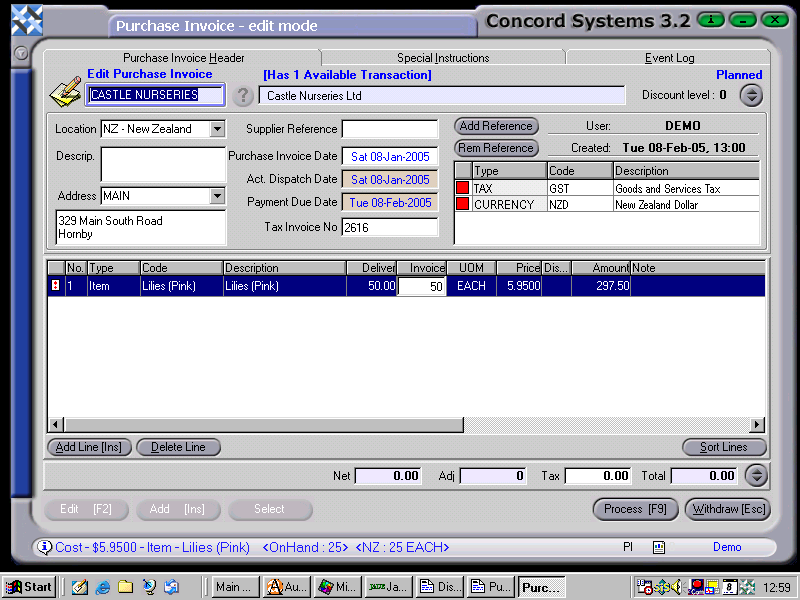
The method used for entering a Purchase Invoice for a stock item is as follows:
Select a supplier, by either clicking on the ? button, or select supplier and use the [up/down arrow keys] on the keyboard.
Add [INS] to enter a new invoice.
Enter the following details:
Supplier Reference
Purchase Invoice Date – which will default to the current date. To select the actual date of the invoice (if it differs), click on Purchase Invoice Date. To change the day, use the [up/down arrow keys] on the keyboard. To change the month, use the [up/down arrow keys + shift key].
Despatch Date and Payment Due Date – default to the same date as the Purchase Invoice Date. Unless they have been set up differently for a specific user.
Add Line[INS]
Code. Use the down arrow to select "Item". Enter the stock code for an item, by using the [Shift + F1] key.
Enter across the headings, filling in the details as appropriate.
NB. Information linked to the product being entered into stock is shown at the bottom of the screen, ie. Stock on hand, price per item.
Concord assumes that where the Tax Type is GST, the net amount (exclusive of GST).will be entered.
The GST will automatically be calculated at the end of the invoice.
Add [INS] as many lines as required. If an error is made, delete if applicable. At the end of entering the details, the
corresponding Net Amount + GST = Total, should correspond with the invoice being entered.
4. Process [F9] using the following options.
Process and complete immediately. The invoice will be completed and confirmed and cannot be edited. The automatic journal will be completed.
Process, but do not complete immediately. This will allow edits which will create another version of the transaction. It will remain confirmed but not completed.
Hold and do not complete immediately. No journals will be completed and the invoice is able to be edited and will remain in a "Planned" state.